

SuperBrain OS: The Complete AI System for How You Run Your Work
Most productivity systems are built for an imaginary person with perfect focus, unlimited time, and no competing priorities. You’re not that person. Neither are we.
SuperBrain OS is a complete AI-powered operating system built inside Notion. It includes Agent iO and a team of specialized AI agents that handle capture, organization, retrieval, and execution across your entire knowledge base.
It’s not a template pack. It’s not a collection of hacks. It’s a full system — built to adapt tothe way your brain actually works — that gets smarter the more you use it.

Your Tools Are Supposed to Help You. Most of Them Don’t.
The average knowledge worker uses dozens of apps, loses hours to context-switching, and still ends most days with the nagging feeling that the important work didn’t get done.
That’s not a willpower problem. That’s a systems problem.
SuperBrain OS fixes the system.
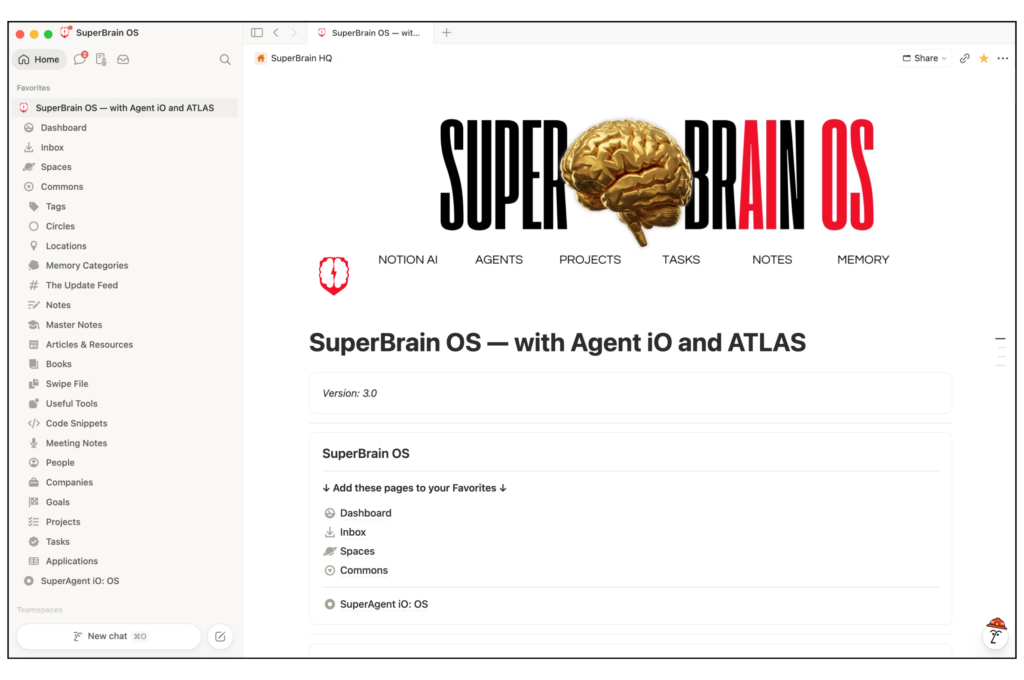

A Complete System, Not Just a Template
SuperBrain OS
with Agent iOThe second brain alternative that manages itself. Pre-built architecture. AI-powered organization. Persistent memory.
SuperBrain OS is a complete AI-driven knowledge management system that runs inside Notion. It follows the CORE principle — Capture, Organize, Retrieve, Execute — using relational databases and a built-in AI team to handle the organizational work you’d otherwise have to do manually.
The architecture is pre-built. You install it, move in, and start using it. The AI handles the rest.
Unlike traditional second brain systems that require constant human maintenance, SuperBrain OS uses AI to manage itself. Pre-built architecture, persistent memory, automatic routing, and self-improvement — so your system gets better the more you use it.
Most knowledge management systems ask you to impose a rigid folder hierarchy on your information. SuperBrain OS uses a relational taxonomy instead, connecting ideas across your entire workspace the way your brain actually makes connections. The AI files, tags, and surfaces information automatically — which means the system gets more useful the more you put into it, rather than harder to maintain.
This Isn’t About Replacing People. It’s About Unlocking Them.
The dominant narrative around AI is replacement — fewer hires, lower costs, leaner teams. We reject that entirely.
Every system inside SuperBrain OS is designed to give you — and the people around you — more capacity, more clarity, and more time for work that actually requires a human. Same effort. Dramatically better output.
One system. Everything in it.
What SuperBrain OS Does
Most knowledge management tools make you choose: a capture tool over here, a project manager over there, a CRM somewhere else, notes in a fourth app. SuperBrain OS puts it all in one place — your information and ideas, your memories, your relationships, and your work — connected, organized, and searchable.

Capture, organize and reference everything
Every idea, note, article, link, or resource you encounter has a place to land. Nothing falls through the cracks, gets lost in a different tab, or sits in a queue waiting for you to decide where it goes. The system captures it and can connect it to everything else — automatically.
Remember anything
SuperBrain OS remembers things so you don’t have to. Decisions you’ve made, things you’ve learned, context that matters — it’s all stored, searchable, and waiting when you need it. Come back to a project six months later and the context is already there. That’s not how most tools work. It’s how this one was designed.
Manage relationships
Every person and organization you work with lives inside the same system as your notes, projects, and ideas — connected to the work that belongs to them. Your network stops being a pile of contacts and becomes an active, searchable layer of context. When you pull up a project, the people connected to it are already there.
Stay in a rhythm
Projects and tasks live where everything else lives — connected to the notes, resources, and people that belong to them. No switching between tools. No copy-pasting context from one app to another. The work and the knowledge that supports it are in the same place, by design.
Built to grow with you
A System to Scale With You
SuperBrain OS starts as a complete, ready-to-use system. But it’s also built to grow. Add new areas of focus. Configure it for a team. Deploy it across an organization. The architecture is designed to expand without rebuilding from scratch — whether you’re a solo operator today or a scaling company tomorrow.
Built for)
Entrepreneurs, solopreneurs, knowledge workers, and neurodivergent thinkers. If you’re constantly capturing ideas, running multiple projects at once, and need your information organized and findable without spending time maintaining it manually — this was built for you.
Not for)
If you want a simple to-do list app, SuperBrain OS is more system than you need. And if you’re new to Notion, get comfortable with the platform before diving in.
Start building your SuperBrain Today
Pre-built architecture. AI-powered organization. Persistent memory.

Agent iO: The AI Team That Runs Your Knowledge Management
The Agent iO System is what separates SuperBrain OS from every other Notion template on the market. At its core is a routing system called the Dispatch Table — it reads every incoming task, identifies the right specialized agent, loads the right skills, and executes.
You don’t need to know how to prompt AI. The system already knows what to do.
How to Make Notion AI Actually Useful
Most people use Notion AI the way they use a search engine — type something in and hope for a useful response. But there’s a better way…
Give it a Role
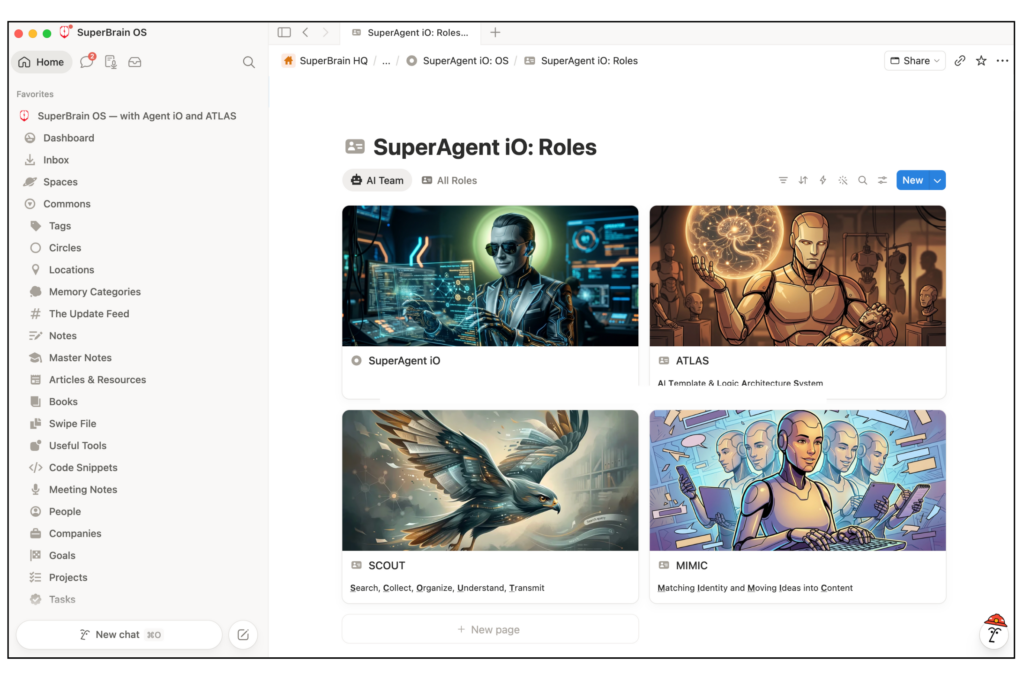
Roles are specialized AI agents — with defined capabilities, a specific domain of expertise, and a set of skills it knows how to run. Build a team of AI specialists, not a single generalist chatbot trying to do everything at once.
Give it Skills
Skills are modular instructions that tell each agent exactly how to handle specific types of work. Add a skill and the agent immediately knows a new behavior — without rebuilding anything from scratch.
Give it Context
Agent iO can get context from the dedicated resources section as well as gathering information from your workspace before it responds. It doesn’t answer in a vacuum. It answers with your actual work in mind.
Give it a Memory
Your decisions, preferences, and facts get logged so the next time you open a thread, Agent iO already knows. No re-explaining. No starting over. Just an AI that remembers what is important.
Give it Directions
Every time you give Agent iO a task, the Dispatch Table reads it and routes it automatically. No prompt engineering needed. Just the right agent, with the right skills, that fires every time.
Help it Improve
Every update to an agent’s instructions is version-controlled. If something breaks, you roll back. If something works, it stays. The system compounds what works and discards what doesn’t.

AGENT IO
INCLUDES ATLAS
Your work will evolve — and when it does, you need a system to evolve with it.
Meet ATLAS, the most powerful role in your system
Tell ATLAS what you need: a new role, a workflow, a capability that doesn’t exist yet. It builds the role, writes the skills, and integrates everything into the existing system. You’re never starting from scratch.
ATLAS is also the meta-layer that keeps the whole system coherent. It enforces the architecture, maintains the rules, and makes sure every new agent is built to spec. The system grows with you — and it grows in the same direction you’re already moving.
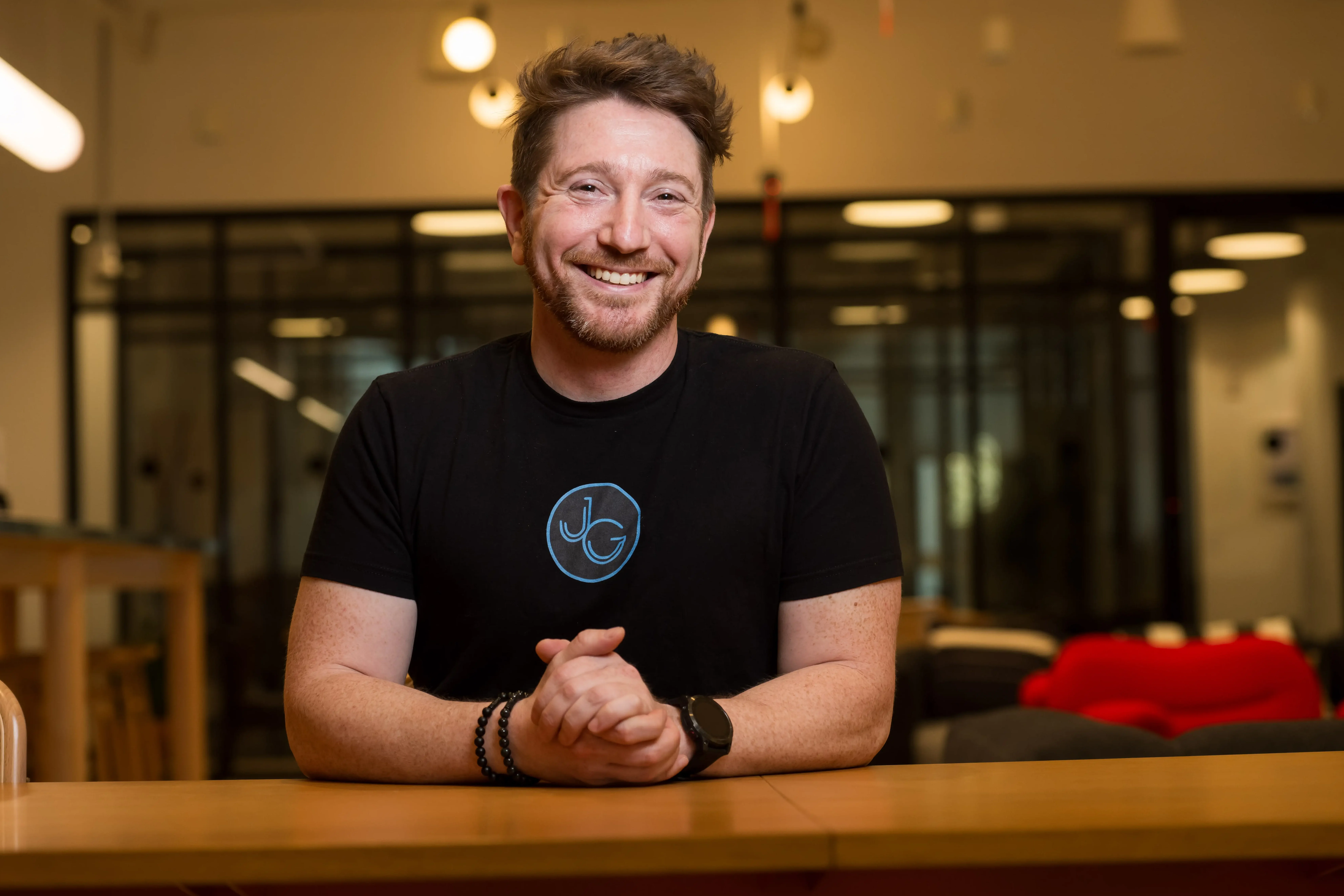
Built by Jeff Gibbard
Jeff Gibbard has spent over a decade building inside Notion — not as a template creator, but as a practitioner running his business in the system he built. SuperBrain OS is the result of that work.
In their own words
Here’s what others say…
“It just amazes me how you figure all the s**t out. You’re insane, meant in the best possible way. Thank you for sharing all your awesomeness with me.”

“I just…I cannot wrap my head around it. One call completely changed the way my brain is working. Just the right spot — not too much, not too little. Mind is officially blown.”

Frequently Asked Questions
SuperBrain OS is a complete AI-powered productivity and work management system built inside Notion, developed by Jeff Gibbard and Super Impactful. It includes AI roles, skills, templates, task systems, knowledge management tools, and content production infrastructure.
Building a Second Brain is a methodology for organizing information using the PARA framework. It’s well-designed — but it depends entirely on you doing the maintenance work: capturing, distilling, organizing, and reviewing on a regular schedule. SuperBrain OS automates that maintenance layer using AI agents. You capture; the system organizes. You also get pre-built architecture, persistent AI memory, and a team of specialized agents — none of which exist in a standard BASB setup.
AI-driven knowledge management is a system where AI agents handle the organizational work — filing, tagging, retrieving, and maintaining your information — rather than requiring you to do it manually. Traditional knowledge management systems like PARA and Building a Second Brain depend on you keeping them organized. An AI-driven system shifts that burden to the AI, so the system stays organized whether or not you have the bandwidth for maintenance.
SuperBrain OS is built inside Notion, but it is more than a template. It is a full operating system that combines Notion’s database and page structure with AI integrations, custom roles, and pre-built workflows. Individual components are available as standalone templates; the full system is available as a complete package.
Yes. Agent iO runs on Notion AI, so an active Notion AI subscription is required to use it. SuperBrain OS itself — the databases, architecture, and workspace structure — works without Notion AI, but Agent iO requires it to function.
Yes. SuperBrain OS includes a structured Persistent Memory database that Agent iO writes to and reads from automatically. When you make a decision, state a preference, or establish a fact in one session, it gets logged. When you return in a future session, Agent iO checks memory before responding — so it already knows your context, your preferences, and your history.
Yes — and ATLAS makes it straightforward. You can modify existing roles and skills, add new ones, or build entirely new agents from scratch. ATLAS handles the architecture: it writes the role, creates the skill set, and integrates everything into the existing system. Every change is version-controlled with a canonical snapshot, so you can roll back if something breaks.
SuperBrain OS is designed for entrepreneurs, solopreneurs, knowledge workers, and teams who want to use AI to work more effectively. It is especially suited to people who have found conventional productivity systems don’t match how their brain actually works.
SuperBrain OS was built by someone who is both Autistic and ADHD. It was built specifically to address the ways traditional productivity systems are set up wrong for neurodivergent users. The core design principles — zero-friction capture, AI-managed organization, non-hierarchical retrieval, no required maintenance schedule — all exist because they solve real problems for ADHD brains. It’s not an ADHD-only template, but it was designed from the ground up with those constraints in mind.
SuperBrain OS works best as your primary workspace rather than something bolted onto an existing setup. That said, many users migrate existing databases and content into SuperBrain OS rather than starting from scratch. The relational architecture makes it straightforward to connect existing databases once the system is in place.
That depends on what your time is worth. If you spend a meaningful amount of time every week trying to find information, reorganize your system, or figure out where something should live — SuperBrain OS pays for itself quickly. If you’ve set up a knowledge management system before and watched it collapse, SuperBrain OS was designed specifically to solve that problem.
You have options. The first step should be to join The Superhero Institute online community. There are threads and courses specifically for the SuperBrain OS. You can also setup an exploratory call to get help customizing your SuperBrain OS.
The Super Brain OS template is $60 with lifetime access. Setup and customization consulting are available for an additional fee.
Start building your SuperBrain Today
Pre-built architecture. AI-powered organization. Persistent memory.
The Best Notion Template for ADHD
An AI-Driven Knowledge Management Designed by a Neurodivergent Brain
Why Traditional Productivity Systems Are Set Up Wrong for Neurodivergent Users
SuperBrain OS was designed by someone with ADHD and autism — built specifically for brains that work differently from the way most productivity systems assume you work. Zero-friction capture means ideas go in immediately, with no filing queue and no decision fatigue at the point of capture. AI-managed organization means the system doesn’t collapse when sustained attention is harder to come by. Non-hierarchical retrieval means you can find what you need without remembering where you put it.
How SuperBrain OS Works for ADHD Brains
Most productivity systems are structured as if maintenance is free. File this. Tag that. Do your weekly review. For neurodivergent users, that maintenance tax is real — and it’s the reason the system breaks down. SuperBrain OS shifts the maintenance burden to AI. You capture. The system organizes. You retrieve. The AI remembers. The only thing you have to do is show up.

The Second Brain Maintenance Problem
Why Traditional Knowledge Management Systems Fail
The idea behind a “second brain” is sound: capture everything important, organize it, and retrieve it when you need it. The concept has been around for years, popularized by Tiago Forte’s Building a Second Brain methodology and its CODE framework (Capture, Organize, Distill, Express), along with the PARA organizational system (Projects, Areas, Resources, Archives).
The problem is what happens after you set it up.
Every second brain template –– whether it’s PARA, GTD, or one of the hundreds of clones on the Notion Marketplace –– hands you a methodology and tells you to build the filing system yourself. You create the databases. You decide where things go. You maintain the connections. You do all the organizing, all the retrieving, all the following up.
Then, the system just sits there.
Sure, for a few weeks, it works because you’re excited. You start filing things and feeling organized. Then life gets busy. You skip a day. Then a week. The inbox piles up. The tags get inconsistent. The notes aren’t connected to anything. And slowly, the whole thing collapses under the weight of its own maintenance.
This isn’t a failure of willpower. It’s a structural problem. These systems ask you to do the one thing that’s hardest to sustain: maintain a complex organizational system indefinitely, by hand, without help.
SuperBrain OS was built to solve that problem.
SuperBrain OS vs. the alternatives
How SuperBrain OS Stacks Up
There are hundreds of “second brain” templates on the Notion Marketplace. SuperBrain OS is the only one built around AI-driven organization instead of manual maintenance — and the only one designed to work for teams, not just individuals.
SuperBrain OS
$60
AI-driven. Pre-built. Scales from solo to team.
Built for both individuals and teams. Unlike every other template, SuperBrain throws away PARA entirely in favor of a relational architecture that AI can actually work with — so the system maintains itself instead of depending on you.
(Official) Building a Second Brain
$69
Tiago Forte’s official PARA template — more expensive, less capable.
A solid entry point if you’re new to knowledge management. But it’s a DIY PARA template — not meaningfully different from the 400+ others on the Notion Marketplace. The system only works if you do.
Thomas Frank’s Ultimate Brain
$79
GTD-influenced and polished — still just PARA with extra steps.
Thomas Frank builds thoughtful, well-crafted templates and Ultimate Brain shows that. But it’s built on PARA and GTD principles — which means it still depends on you to keep it running. Good for individuals, not designed for teams or AI.